V12Mate: How to Install It With Downloader Code 2494311 and Log In
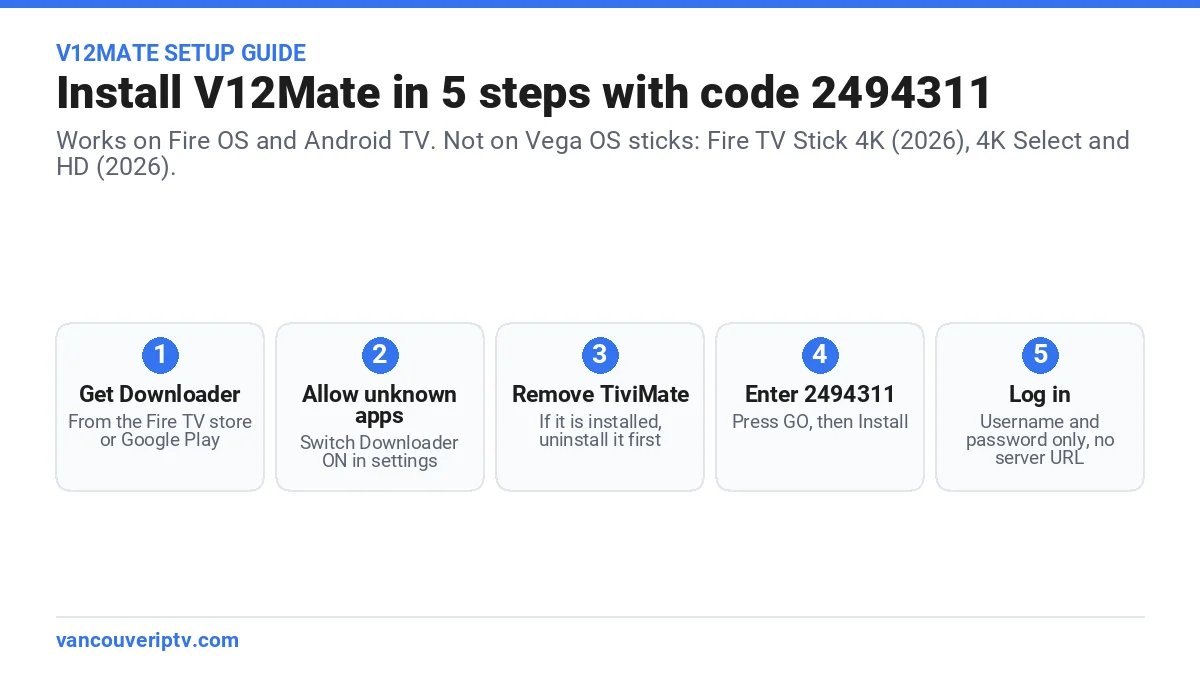
V12Mate is our free IPTV player for Fire TV and Android TV. You install it with the Downloader code 2494311, then sign in with the username and password we send you. No server URL is needed. One warning first: the newest Fire TV Sticks run Vega OS and cannot install it.
Run the free trial on the device you already own. Every plan has our 7-day refund policy, and every plan length is on our IPTV plans Canada page.
V12Mate: the short answer
V12Mate is a player app, not a channel service. It plays the channels in your Vancouver IPTV subscription and nothing else.
Because the app is ours, it already knows our server. You type only your username and password. Most other players also ask for a server URL.
The app is free. Live TV, the TV guide and VOD come with your plan, with no in-app upgrade to buy. V12Mate works with our service only. For a login from another provider, use TiviMate, IPTV Smarters Pro or another Xtream Codes player.
Which devices can run V12Mate?
V12Mate installs through the Downloader app. Downloader runs on Fire OS and Android TV, so those devices work. Amazon’s newer Vega OS blocks apps from outside the Amazon Appstore, and AFTVnews confirms Vega OS devices don’t support Downloader. So V12Mate can’t install there.
| Device | System | V12Mate |
|---|---|---|
| Fire TV Stick 4K Max | Fire OS | Yes |
| Fire TV Cube | Fire OS | Yes |
| Fire TV Stick 4K Plus, Fire TV Stick 4K (2018 and 2023 models), Fire TV Stick Lite | Fire OS | Yes |
| Smart TVs with Fire TV built in (Toshiba, Insignia, Hisense) | Fire OS | Yes |
| Android TV and Google TV (Sony, TCL, Hisense, Nvidia Shield, Chromecast with Google TV) | Android | Yes |
| Fire TV Stick 4K (3rd gen, 2026) | Vega OS | No |
| Fire TV Stick 4K Select | Vega OS | No |
| Fire TV Stick HD (2026) | Vega OS | No |
| Samsung, LG, iPhone, Apple TV | Tizen, webOS, iOS | No, use another player |
Buying a stick for IPTV? Watch the name. The new Fire TV Stick 4K launched in fall 2026 runs Vega OS and replaces the 4K Select and 4K Plus. That leaves the Fire TV Stick 4K Max as the only Fire OS stick in Amazon’s current lineup.
How to install V12Mate on a Firestick (code 2494311)
- Turn on Developer Options: open Settings → My Fire TV → About and press Select 7 times on your device name.
- Go to Find → Search, type Downloader and install the orange app by AFTVnews.
- Open Settings → My Fire TV → Developer Options → Install unknown apps and switch Downloader ON.
- If TiviMate is installed, uninstall it first. Otherwise the app will not install.
- Open Downloader, enter 2494311, press GO, then Install.
Every screen, with tips for older Fire TV menus, is in the Fire TV section of our step-by-step IPTV setup guide.
How to install V12Mate on Android TV and Google TV
- Install Downloader from the Google Play Store.
- Allow unknown apps for Downloader in Settings → Security & Restrictions. The menu name changes a little by TV brand.
- Uninstall TiviMate if it is on the device.
- Open Downloader, enter 2494311 and press GO.
- Accept the privacy policy, press Install, then Open.
How to log in to V12Mate
- Open V12Mate and press Add playlist.
- Choose V12MATE.
- Type the username and password from your WhatsApp message. Skip the server URL; the app fills it in.
- Press Next and keep TV channels and VOD selected.
- Wait about one minute, then press Done.
The TV guide fills in over the first few minutes. You can check it in Settings → EPG.
V12Mate not working? 4 quick fixes
- The app won’t install. TiviMate is probably on the device. Uninstall it and run code 2494311 again.
- Only a “Cancel” button appears. Message us on WhatsApp. We send the fix there.
- No channels after login. A login detail is mistyped. Open Settings → Playlists → V12Mate → Xtream Codes Parameters and check every capital letter.
- Downloader isn’t in the Fire TV store. Your stick runs Vega OS, so the app can’t install. Use a Fire OS or Android TV device, or ask us on WhatsApp which player fits.
V12Mate, TiviMate or IPTV Smarters Pro?
V12Mate is the shortest setup on Fire OS and Android TV, because it skips the server URL. TiviMate works with any provider, but its VOD needs the paid Premium upgrade. IPTV Smarters Pro runs on more devices, including some Smart TVs.
Our IPTV Smarters Pro subscription guide compares all three apps side by side.
Get a login for V12Mate: 12 months for $59.99
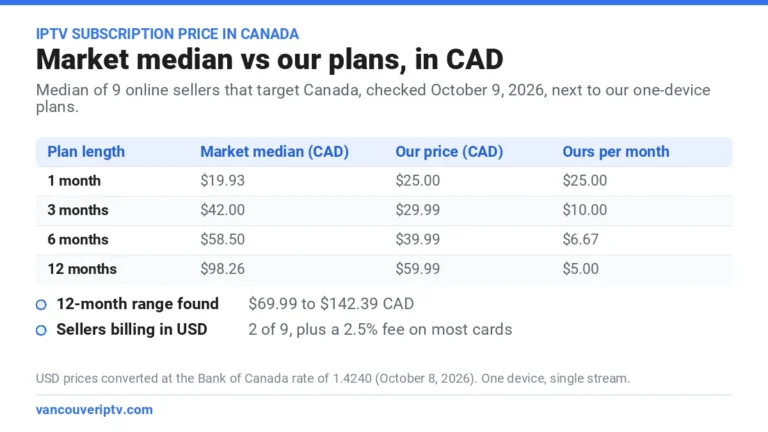
V12Mate is free, but it needs a subscription to play anything. Our IPTV subscription in Canada costs $59.99 CAD for 12 months on one device. Start with the free 24-hour trial on the device you plan to use.
The free 24-hour trial runs on your own connection, at the hour your household actually watches. No credit card, no contract.
Start my free 24-hour trialV12Mate FAQ
Is V12Mate free?
Yes. The app costs nothing. You pay only for your Vancouver IPTV subscription, which includes live TV and VOD.
What is the V12Mate Downloader code?
The code is 2494311. Type it in the Downloader app on a Fire OS or Android TV device, then press GO.
Does V12Mate work on the new Fire TV Stick 4K?
Not on the 2026 model. It runs Vega OS, like the Fire TV Stick 4K Select and the 2026 Fire TV Stick HD. The Fire TV Stick 4K Max and Fire TV Cube still run Fire OS and work.
Can I use V12Mate with another IPTV provider?
No. It is built for our service, which is why it skips the server URL. For another provider, use an Xtream Codes player such as TiviMate.
Is V12Mate on iPhone or Samsung TVs?
No. On iPhone, Apple TV, Samsung and LG, use the player listed for your device in our installation guide.
Vancouver IPTV is an independent Canadian reseller. Fire TV details come from Amazon announcements and tech press in October 2026, and can change. Fire TV, Android TV, Google TV, TiviMate and IPTV Smarters names belong to their respective owners. Vancouver IPTV does not host content; all content is supplied by third-party providers, and channel lineups are subject to change. See our DMCA notice.